Running AI models on a Raspberry Pi is increasingly doable with the right strategies. Using a recent Pi model, like the Raspberry Pi 4, along with hardware accelerators such as Google Coral or Intel Neural Compute Stick, can boost performance. Optimizing software with lightweight frameworks like TensorFlow Lite or compressing models also helps. Combining these hardware and software tweaks with cloud offloading makes deploying AI on a Pi practical, and if you want to explore more, you’ll find useful tips below.

Get tech for your team delivered free — and shop member deals
- Fast, free delivery on millions of items
- Access to Prime Big Deal Days deals on October 6–7
- Prime Video, Amazon Music and more included
Key Takeaways
- Running lightweight models locally with frameworks like TensorFlow Lite or PyTorch Mobile offers real-time AI on Raspberry Pi.
- Hardware accelerators such as Google Coral USB or Intel Neural Compute Stick significantly boost inference speeds.
- Offloading complex AI tasks to cloud platforms reduces Raspberry Pi’s processing demands while maintaining functionality.
- Model compression techniques like quantization and pruning improve performance and responsiveness on limited hardware.
- A hybrid approach combining local lightweight models and cloud processing provides practical and scalable AI solutions.
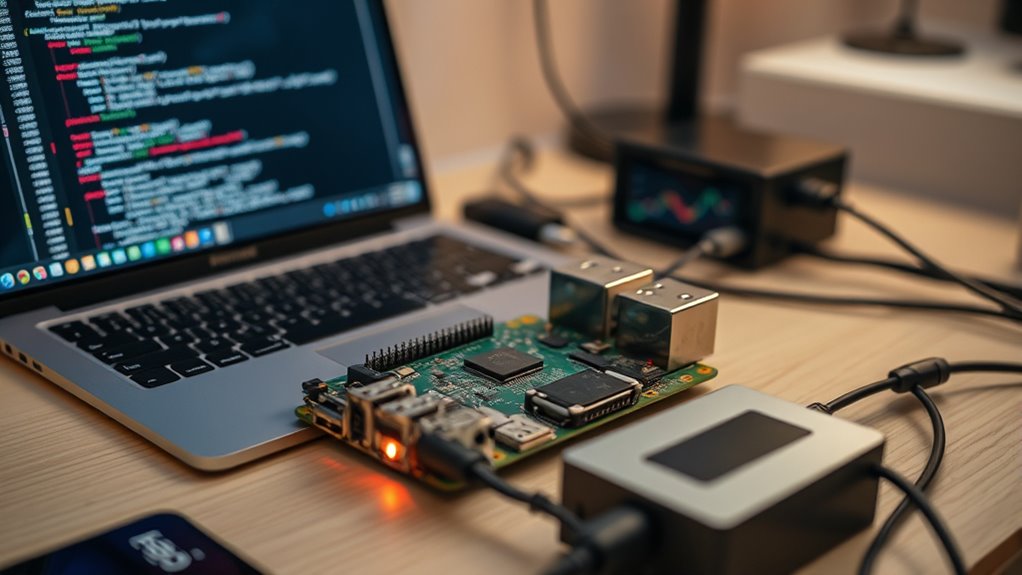
Running AI models on a Raspberry Pi has become increasingly feasible, allowing enthusiasts and developers to deploy intelligent applications on a compact, affordable device. While the Pi isn’t as powerful as high-end servers, you can still run certain AI models effectively by leveraging strategic techniques like cloud deployment and hardware optimization. Instead of trying to run everything locally, you can offload intensive tasks to the cloud and keep the Raspberry Pi focused on lightweight, real-time processing. This hybrid approach reduces the load on your hardware and makes your AI applications more responsive and efficient. For example, you might run a simple image classification model locally to handle immediate responses, while sending more complex tasks to the cloud for processing.
When it comes to hardware optimization, selecting the right Raspberry Pi model is essential. The Raspberry Pi 4 or newer versions with increased RAM and better CPU performance offer a more suitable foundation for AI tasks. Additionally, optimizing your setup involves using hardware accelerators like the Google Coral USB Accelerator or Intel’s Neural Compute Stick. These devices provide dedicated AI processing power, dramatically improving inference speeds without overtaxing your Pi’s CPU. You should also guarantee your software is streamlined; using lightweight frameworks like TensorFlow Lite or PyTorch Mobile helps you run models smoothly on constrained hardware. Compressing models through quantization or pruning further reduces their size and increases speed, making the entire system more responsive. Incorporating hardware accelerators can significantly enhance performance, especially when working with limited-resource devices like the Raspberry Pi.
Deploying models in the cloud can be a game-changer. Instead of trying to run large neural networks directly on the Pi, you set up your AI service on a cloud platform like AWS, Google Cloud, or Azure. Your Raspberry Pi then acts as a front-end device, capturing data and sending it to the cloud for heavy lifting. This approach allows you to keep the Pi’s hardware demands minimal while still benefiting from sophisticated AI capabilities. It also opens up options for scaling; as your project grows, you can upgrade your cloud resources without replacing the Pi itself. This combination of cloud deployment and hardware optimization makes running AI on a Raspberry Pi practical and scalable, giving you a powerful tool for various applications — from home automation to robotics.
Raspberry Pi 4 AI accelerator kit
As an affiliate, we earn on qualifying purchases.
As an affiliate, we earn on qualifying purchases.
Frequently Asked Questions
Can I Run Real-Time AI Models on a Raspberry Pi?
You can run real-time AI models on a Raspberry Pi, but it depends on the complexity of your neural networks. For edge computing tasks, lightweight models work best, allowing you to process data locally without relying on cloud services. Optimize your neural networks for performance, and consider using hardware accelerators like the Coral USB. This setup enables you to achieve efficient, real-time AI capabilities right on your Raspberry Pi.
What Are the Best AI Frameworks Compatible With Raspberry Pi?
You might think traditional AI frameworks are too heavy for a Raspberry Pi, but in reality, lightweight options excel here. TensorFlow Lite, PyTorch Mobile, and Edge Impulse are optimized for neural network deployment through model compression, making them ideal. These frameworks allow you to run efficient AI models on limited hardware, proving that with the right tools, complex neural network tasks are achievable even on small devices like the Raspberry Pi.
How Much RAM Do I Need for Complex AI Tasks?
For complex AI tasks, you need enough RAM to handle memory management efficiently and overcome hardware limitations. Generally, 8GB or more is ideal for demanding models, ensuring smooth processing and avoiding crashes. If you’re working with smaller models or lightweight tasks, 4GB may suffice. Remember, the key is balancing your hardware capabilities with your project’s complexity to prevent bottlenecks and optimize performance.
Is GPU Acceleration Possible on Raspberry Pi for AI?
Imagine your Raspberry Pi as a tiny race car struggling to keep up in a high-speed chase—GPU acceleration is limited here. While some Pi models have GPU capabilities, they’re no match for dedicated GPUs, facing significant GPU limitations. Plus, enabling GPU acceleration spikes power consumption, risking overheating and instability. So, you won’t get robust AI performance with GPU acceleration on a Pi; it’s better suited for lightweight tasks.
How Do I Optimize Models for Low-Power Devices Like Raspberry Pi?
To optimize models for low-power devices like Raspberry Pi, focus on edge computing strategies. You can improve performance by applying model pruning, which reduces size and complexity without sacrificing accuracy. Additionally, consider quantization to lower precision, making models faster and more efficient. These techniques help your device handle AI tasks smoothly, conserving power while maintaining useful functionality. This way, your Raspberry Pi becomes a capable edge computing device for AI applications.
Google Coral USB Accelerator for Raspberry Pi
As an affiliate, we earn on qualifying purchases.
As an affiliate, we earn on qualifying purchases.
Conclusion
Now, imagine powering your Raspberry Pi and watching it run AI models seamlessly, almost like magic. The possibilities are endless—smart home devices, robotics, or even personal assistants—all within your grasp. But what if the real breakthroughs are just ahead? With continued advancements, your Pi could soon handle even more complex tasks. Stay tuned, because the future of compact AI is unfolding right before your eyes, and you’re right at the edge of it.
As an affiliate, we earn on qualifying purchases.
TensorFlow Lite for Raspberry Pi
As an affiliate, we earn on qualifying purchases.
As an affiliate, we earn on qualifying purchases.
Halloween Picks
halloween
As an affiliate, we earn on qualifying purchases.