An enterprise firewall appliance should protect all entry points to your network, including cloud environments, user identities, and data in transit. It needs to monitor and control traffic, inspect encrypted data, and prevent data leaks. You must also enforce strong access controls, detect and block threats, and guarantee compliance with regulations. With layered defenses and continuous monitoring, your security remains resilient against evolving cyber threats. Keep exploring to discover how to strengthen your overall security framework further.
Key Takeaways
- Critical data and applications across on-premise and cloud environments to prevent data breaches and leaks.
- User identities and access rights through multi-factor authentication and role-based controls.
- Network traffic, including encrypted and API communications, for malware, ransomware, and zero-day threats.
- Policy compliance and visibility to ensure security standards and facilitate audits.
- Resilience against evolving cyber threats via continuous monitoring and adaptive security measures.

Are you confident that your enterprise firewall appliance is fully protected against the latest cyber threats? If not, you need to understand what it should really guard against. Today’s digital landscape demands that your firewall isn’t just a barrier but a dynamic defense system. It must integrate seamlessly with cloud environments, guaranteeing your data and applications are secure no matter where they reside. Cloud integration is essential because more businesses are migrating to cloud platforms, and your firewall needs to monitor and control traffic between your on-premise network and cloud services. This means inspecting encrypted traffic, managing API calls, and preventing data leaks, all while maintaining high performance. Without proper cloud integration, your security gaps widen, exposing your enterprise to breaches and compliance issues.
User authentication is another critical aspect your firewall must enforce rigorously. It’s not enough to rely solely on network-level protections; verifying who is accessing your resources is paramount. Your firewall should support multi-factor authentication, single sign-on, and role-based access controls to ensure only authorized personnel can reach sensitive data or critical systems. Effective user authentication prevents unauthorized access and reduces the risk of insider threats. When combined with advanced logging and real-time alerts, it allows you to track suspicious activities and respond promptly. Remember, the weakest link in security often involves compromised credentials, so robust authentication mechanisms are non-negotiable.
Beyond cloud integration and user authentication, your firewall should be capable of deep packet inspection and intrusion detection. This means scrutinizing data packets for malicious payloads or unusual patterns that could signify an attack. It’s essential to stay ahead of evolving threats like malware, ransomware, and zero-day exploits. Your firewall’s ability to adapt and update signatures or leverage AI-driven anomaly detection adds an extra layer of defense. It’s equally important that your firewall supports secure VPN connections for remote workers, ensuring they access resources safely from any location. Additionally, a comprehensive security posture should incorporate regular vulnerability assessments to identify and remediate potential weaknesses proactively. Incorporating threat intelligence feeds can also enhance your firewall’s ability to recognize emerging threats quickly.
Furthermore, your enterprise firewall should facilitate extensive policy management. You need granular control over what traffic is permitted, blocked, or monitored. This ensures compliance with industry regulations and internal security standards. A firewall that provides detailed visibility into network activity helps identify vulnerabilities before they’re exploited. Regular audits and updates are indispensable to keep your protections current.
In essence, your enterprise firewall appliance isn’t just about blocking unwanted traffic; it’s about creating a resilient security framework that adapts to modern threats. It must integrate with cloud services, enforce stringent user authentication, and provide thorough oversight of all network activity. Only then can you be confident that your enterprise is truly protected against the complex cyber threats of today’s digital world.
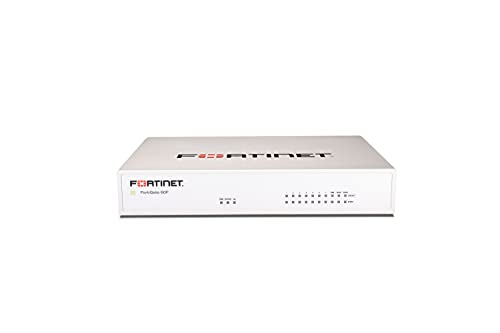
FortiGate-60F Firewall Appliance – 10 Gigabit Ethernet RJ45 Ports, Includes DMZ, WAN & Internal Ports (Appliance Only, No Subscription) (FG-60F)
Extensive Connectivity Options: The FortiGate 60F is designed with 10 GE RJ45 ports, including 2 WAN ports, 1…
As an affiliate, we earn on qualifying purchases.
As an affiliate, we earn on qualifying purchases.
Frequently Asked Questions
How Often Should Firewall Firmware Be Updated?
You should update your firewall firmware regularly, ideally every one to three months, to minimize firmware vulnerabilities. Frequent updates help patch security flaws and improve performance, reducing the risk of cyber threats. Keep an eye on vendor notifications for critical updates and set a consistent update schedule. Ignoring update frequency can leave your firewall exposed to vulnerabilities, so proactive maintenance is essential for protecting your network effectively.
Can Firewalls Prevent Insider Threats Effectively?
You might be surprised to learn that 60% of insider threats come from current or former employees. Firewalls can help, but they’re not enough alone. To effectively prevent insider threats, you need strong access controls and insider awareness. By monitoring suspicious activities and restricting unnecessary access, firewalls become part of a broader security strategy that detects and discourages malicious insider actions.
What Are the Common Signs of Firewall Breaches?
You’ll notice signs of firewall breaches like sudden unauthorized access attempts or unusual activity in your network logs. If you see unexpected spikes in data transfer or malware infiltration alerts, it’s a red flag. Other signs include unexplained system slowdowns or repeated login failures. These indicators suggest your firewall might be compromised, so you need to investigate further to prevent potential data breaches and safeguard your network’s security.
How Does Encryption Impact Firewall Performance?
Imagine a busy highway with cars (data packets) racing through. Encryption overhead introduces extra lanes and speed bumps, causing performance degradation. You might notice slower data processing and increased latency. While encryption boosts security, it demands more resources from your firewall, impacting its efficiency. Balancing encryption’s benefits with performance needs requires careful configuration to prevent security from overwhelming your firewall’s capabilities.
Is Physical Security Necessary for Firewall Appliances?
Yes, physical security is necessary for firewall appliances. You should implement physical safeguards like locked server rooms and surveillance to prevent unauthorized access. Access controls are essential, guaranteeing only authorized personnel can handle or maintain the device. Protecting your firewall physically reduces risks of tampering, theft, or damage, which could compromise your entire network. Combining physical safeguards with proper access controls ensures your firewall remains secure and effectively protects your enterprise network.
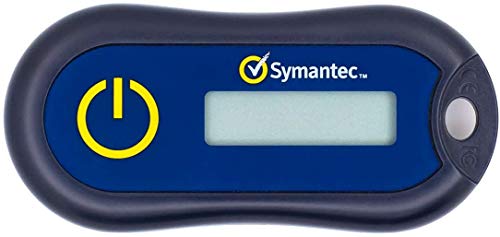
Symantec VIP Hardware Authenticator – OTP One Time Password Display Token – Two Factor Authentication – Time Based TOTP – Key Chain Size
Standard OATH compliant TOTP token (time based)
As an affiliate, we earn on qualifying purchases.
As an affiliate, we earn on qualifying purchases.
Conclusion
Remember, an enterprise firewall isn’t just a digital moat—it’s your castle’s first line of defense. You’ve got to protect against threats like malware, intrusions, and data leaks, just like knights defending their kingdom. Think of it as your trusty TARDIS, keeping your data safe across time and space. Stay vigilant, keep your defenses updated, and don’t forget: even in the age of cyber dragons, a solid firewall is your best armor.

Palo Bytes: Quick Config Examples for Firewall Engineers
As an affiliate, we earn on qualifying purchases.
As an affiliate, we earn on qualifying purchases.

TP-Link ER7206 Multi-WAN Professional Wired Gigabit VPN Router Increased Network Capacity SPI Firewall Omada SDN Integrated Load Balance Lightning Protection
【Flexible Port Configuration】1 Gigabit SFP WAN Port + 1 Gigabit WAN Port + 2 Gigabit WAN/LAN Ports plus1…
As an affiliate, we earn on qualifying purchases.
As an affiliate, we earn on qualifying purchases.