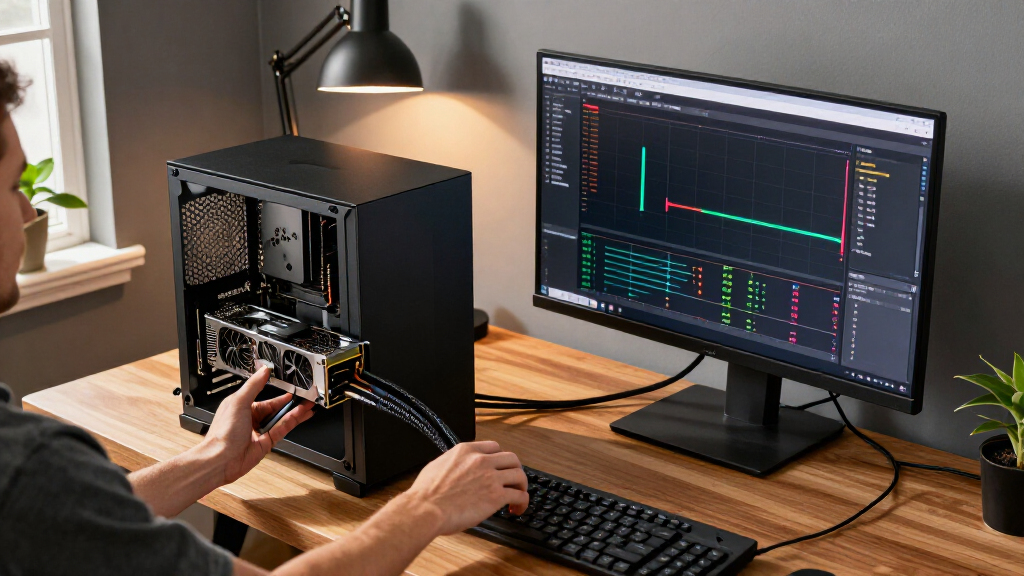

This checklist is for people upgrading the hardware around AI tools and automation, from a compact computer to the connections and peripherals that support a desk setup. Use it to review the listed picks against your actual tasks, workspace, and existing equipment.

Get business pricing on tech for your team
- Business-only prices and quantity discounts
- Tax-exempt purchasing
- Multiple users, one account, clear invoices
The sections follow the product categories in order: Mini PC, microphone, webcam, portable storage, docking station, and Wi-Fi. Each section explains why the category matters, what to check before choosing, and the practical role of the named pick.
Before buying, confirm the product’s full specifications and compatibility with your computer, operating system, software, and other devices. The product names provide useful clues, but they do not answer every fit or setup question; check the manufacturer’s details for those.
Mini PC
A mini PC can be a useful space-conscious computing option for an automation workspace, but the right fit depends on the software and tasks you expect it to handle. Start by listing the applications you use, the operating system they require, and any memory, storage, or graphics needs stated by their developers. The name of this pick identifies a Ryzen AI Max+ 395 processor and an advertised speed of up to 5.1 GHz; it does not establish the full configuration or guarantee compatibility with a particular workload.
A common buying mistake is treating a processor name or clock speed as a complete measure of system suitability. Check the exact memory and storage configuration, available ports, networking options, dimensions, power requirements, and supported displays. Confirm that the system can connect to your peripherals and fit the intended mounting or desk arrangement. Also verify whether the product listing describes the exact configuration you plan to order.
GMKtec AI Mini PC Ryzen AI Max+ 395 is the named pick for this slot. Review its complete specifications alongside your software requirements, especially if you rely on local AI workloads or multiple connected devices. Match capacity and connectivity to your real setup before deciding.
What to look for:
- Confirm the exact processor, memory, and storage configuration.
- Match operating system and application requirements.
- Check port types and counts for your peripherals.
- Verify display support and networking details.
- Measure the unit and confirm its power requirements.
GMKtec AI Mini PC Ryzen AI Max+ 395 (up to 5.1 GHz)

The GMKtec EVO‑X2 is a high‑performance mini PC built around the AMD Ryzen AI Max+ 395 APU, featuring 16 Zen 5 cores, an integrated Radeon 8090S iGPU and up to 64 GB of LPDDR5X memory. It supports quad‑screen 8K output, Wi‑Fi 7, 2.5 GbE Ethernet and offers dual M.2 PCIe 4.0 SSD slots for up to 8 TB of storage.
Pros:
- Powerful AI‑focused APU with 16 cores and high boost clock
- Integrated Radeon iGPU capable of FHD gaming at high settings
- Supports up to four 8K/4K displays via HDMI, DisplayPort and USB‑C
- Fast Wi‑Fi 7 and 2.5 GbE Ethernet for excellent network performance
Cons:
- High power draw (65 W) may increase energy costs
- Limited upgradeability due to onboard LPDDR5X memory
Best for: People seeking a mini PC for an automation workspace.
Not ideal for: Buyers who need confirmed specifications that the listing does not provide.
Bottom line: Check the exact configuration and software requirements before choosing the GMKtec mini PC.
USB microphone
A microphone affects how clearly your voice comes through in calls, recordings, and streamed content. For automation work, that can matter when you record instructions, join meetings, or create voice content. The listed RØDE PodMic USB is described as a dynamic broadcast microphone with XLR and USB-C connections. Those connection options are a starting point for checking whether it fits your computer and any audio equipment you already own.
Do not assume every connection works with every device or that a cable is included. Confirm the supported connection method for your computer, the required cables, and whether your recording or meeting software recognizes the microphone. If you intend to use XLR, check what other audio equipment your setup requires. Consider where the microphone will sit, how close you can speak to it, and whether your desk arrangement leaves room for its mounting needs.
The RØDE PodMic USB is the pick for this slot. Its named USB-C and XLR connections give you two connection types to investigate, but the product details should confirm what is supplied and supported. Choose based on your recording setup and how you plan to use the microphone day to day.
What to look for:
- Confirm USB-C compatibility with your computer and operating system.
- Check whether cables or mounting hardware are included.
- Verify what additional equipment an XLR setup requires.
- Confirm compatibility with your recording and meeting software.
- Make sure the placement works with your desk and speaking position.
RØDE PodMic USB Dynamic Broadcast Microphone with XLR and USB-C
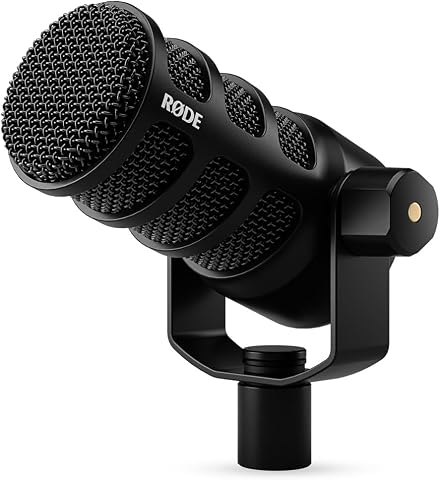
The PodMic USB is a dynamic microphone for podcasting, streaming, gaming, and other speech applications, with both XLR and USB-C outputs. It includes APHEX digital signal processing over USB, a built-in pop filter and shock mount, and zero-latency headphone monitoring.
Pros:
- Offers both XLR and USB-C connections
- APHEX DSP processing over USB
- Zero-latency headphone monitoring
- Built-in pop filter and internal shock mount
Cons:
- APHEX DSP features are available over USB
- Warranty is one year unless extended through product registration
Best for: People choosing between USB-C and XLR workflows.
Not ideal for: Buyers who need a complete setup without checking included accessories.
Bottom line: Match the PodMic USB’s connections and mounting needs to your recording setup.
Webcam
A webcam is worth checking when your work involves video calls, streaming, or content creation. The listed Razer Kiyo V2 Pro is described as a webcam for streaming and content creation, with 4K 60 FPS in its name. Treat those details as prompts to confirm the exact supported modes and system requirements rather than assuming every app or computer can use them.
A frequent mistake is focusing on a headline video specification while overlooking the rest of the setup. Check the connection type, supported resolutions and frame rates, operating system compatibility, and whether your chosen software supports the modes you intend to use. Consider mounting: verify that the webcam can attach to your monitor or other planned position, and that its placement suits your framing. If you plan to use it for calls, check how it behaves with the conferencing software you rely on.
Razer Kiyo V2 Pro Webcam is the pick in this category. Its stated use covers streaming and content creation, so it may suit a setup that needs a dedicated camera. Before choosing, confirm the full requirements and ensure your computer, display placement, and software align with the intended use.
What to look for:
- Verify the supported resolution and frame-rate modes.
- Check connection and operating system requirements.
- Confirm support in your video and streaming applications.
- Make sure the mount fits your monitor or planned position.
- Review the complete listing for included accessories and setup needs.
Razer Kiyo V2 Pro Webcam for Streaming and Content Creation, 4K 60 FPS

The Razer Kiyo V2 Pro delivers ultra‑sharp 4K video at 60 FPS with an 8.3MP Sony STARVIS 2 sensor, ideal for streamers, creators, and professional video calls. AI‑powered auto‑framing keeps you centered while low‑light enhancement and HDR provide clear, vibrant images in challenging lighting.
Pros:
- Ultra‑sharp 4K video at 60 FPS with reduced motion blur.
- AI‑powered auto‑framing and face tracking keep you centered during movement.
- One‑click low‑light enhancement and HDR deliver clear, vibrant images in dim or mixed lighting.
- Extensive manual controls via Razer Synapse for DSLR‑level customization.
Cons:
- No built‑in microphone; external audio is required.
- Relatively large footprint may not fit all monitor setups easily.
- Not water resistant, limiting use in humid environments.
Best for: People looking for a webcam for streaming or content creation.
Not ideal for: Buyers whose computer or software cannot use the desired video modes.
Bottom line: Confirm the Kiyo V2 Pro’s modes, compatibility, and mounting fit before buying.
Portable SSD
Portable storage can help keep files available across compatible devices, but this section’s named pick needs special attention: “ASUS ROG Flow Z13 (2025) 2-in-1 Gaming Laptop, 13-inch 2.5K 180Hz Touc” reads like a laptop product title, not a portable SSD. Do not assume it is a storage drive based on its placement in this checklist. Confirm the intended product and its complete name before comparing it with storage options.
For a portable SSD, check the drive’s capacity, connection interface, transfer compatibility, physical size, and the file systems supported by your devices. Confirm whether your computer has a matching port and whether any cable is included. If you plan to move files between operating systems, check how the drive is formatted and whether reformatting would affect files already stored on it. Consider what you will carry and back up, and choose capacity around that real need.
Verify the product identity first before treating the ASUS ROG Flow Z13 as the pick for this slot. The supplied name describes a 2-in-1 gaming laptop and includes display details, but does not identify a portable SSD. Resolve that mismatch in the product listing, then evaluate the actual storage device using its specifications and your devices’ compatibility.
What to look for:
- Confirm the intended product is a portable SSD.
- Check storage capacity against your files and backup needs.
- Match the drive interface to your computer’s ports.
- Verify supported file systems across your devices.
- Check included cables, dimensions, and the complete product name.
ASUS ROG Flow Z13 (2025) 2-in-1 Gaming Laptop, 13-inch 2.5K 180Hz Touchscreen, A

The ASUS ROG Flow Z13 is a portable 2-in-1 gaming laptop with a 13-inch touchscreen, a 170° kickstand, and AMD Ryzen AI MAX+ 395 processing with RDNA 3.5 graphics. Its 180Hz display, 128GB of memory, and vapor chamber cooling support gaming and creative work on the go.
Pros:
- High-refresh-rate touchscreen with 100% DCI-P3 coverage
- Large 128GB memory capacity
- Portable 2-in-1 design with a flexible kickstand
- Includes a 90-day PC Game Pass offer
Cons:
- Integrated graphics may limit performance in demanding games compared with dedicated graphics
- Battery life is listed as up to 10 hours, which may vary with use
Best for: People who confirm the intended portable SSD before purchase.
Not ideal for: Buyers expecting the supplied laptop name to identify an SSD.
Bottom line: Resolve the product-name mismatch before selecting storage for this slot.
USB-C docking station
A docking station can bring multiple desk connections together, but its usefulness depends on the computer and peripherals it must connect. The named Dell Pro Thunderbolt 5 Smart Dock SD25TB5 includes “300W Power Delivery” in its title. Confirm the full product specifications and your computer’s supported connection standard before assuming the dock will provide a particular feature or charging arrangement.
Common mistakes include buying a dock based on its connector name alone, overlooking display requirements, or assuming the power figure suits every laptop. Check the host computer’s port capabilities, the dock’s supported displays and resolutions, and the ports needed for monitors, storage, network, audio, and accessories. Confirm power delivery requirements for your specific computer and whether the supplied power adapter and cables meet your setup. Also consider cable reach and where the dock will sit.
Dell Pro Thunderbolt 5 Smart Dock SD25TB5 is the pick for this category. Its title identifies a Thunderbolt 5 dock and states 300W Power Delivery, which are details to compare with your computer’s requirements. Verify compatibility from the full specifications before connecting your desk around it.
What to look for:
- Confirm your computer supports the dock’s connection standard.
- Check monitor count, resolution, and refresh support.
- Match available ports to your peripherals.
- Verify power requirements and what adapter is included.
- Check cable length and placement for your desk.
Dell Pro Thunderbolt 5 Smart Dock SD25TB5 with 300W Power Delivery and Multiple

The Dell Pro Thunderbolt 5 Smart Dock SD25TB5 offers high-performance connectivity with dual Thunderbolt 5 ports, supporting up to four 4K displays at 120Hz or an 8K display. It delivers up to 300W power to compatible systems and includes various ports for peripherals, along with remote management and security features.
Pros:
- Supports multiple high-resolution displays with high refresh rates
- Delivers powerful 300W charging for compatible systems
- Includes extensive connectivity options and security features
- Remote management capabilities for enterprise use
Cons:
- Heavy reliance on Thunderbolt 5 ports, which may limit compatibility with older devices
- Premium price point may be high for some users
- Requires compatible systems to utilize full power delivery and display features
Best for: People building a desk around compatible Thunderbolt connections.
Not ideal for: Buyers whose computers lack the required ports or power support.
Bottom line: Match the SD25TB5’s full specifications to your computer and connected devices.
Wi-Fi 7 router
Network equipment matters when your automation tools and connected devices rely on Wi-Fi. The listed NETGEAR Orbi 970 Series is identified as a WiFi 7 mesh system in a 3-pack. Confirm that your internet service, client devices, home layout, and network needs make those capabilities relevant. The product name alone does not establish coverage for a particular building or performance in your rooms.
A common mistake is choosing a mesh system without planning where its units will go or checking device compatibility. Review the full system contents and setup requirements, then consider the layout, walls, and locations where you need a reliable connection. Confirm that your devices support the WiFi generation and features you plan to use. Check how the system connects to your existing modem or gateway, and whether your provider or current network arrangement requires specific settings.
NETGEAR Orbi 970 Series WiFi 7 Mesh System is the named pick for this slot. Its title states WiFi 7 and a three-pack, which gives you details to compare with your home setup. Confirm compatibility and placement requirements before replacing or extending your current network.
What to look for:
- Check compatibility with your modem, gateway, and internet service.
- Confirm your devices support the WiFi features you need.
- Plan locations for all included mesh units.
- Review setup requirements and network settings.
- Consider building layout and the locations needing coverage.
NETGEAR Orbi 970 Series WiFi 7 Mesh System (3-Pack)
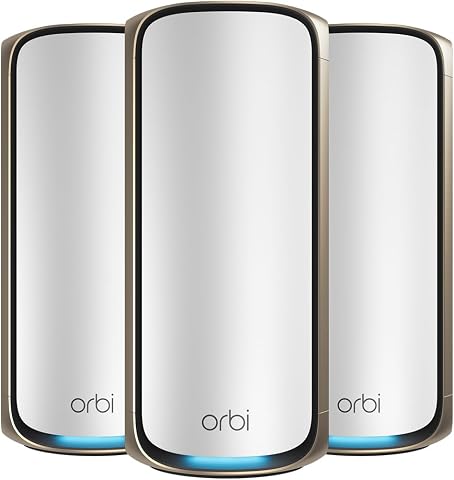
The NETGEAR Orbi 970 Series is a 3-pack WiFi 7 mesh system (router plus 2 satellites) providing up to 10,000 sq ft of coverage and support for up to 200 connected devices. It delivers speeds up to 27 Gbps using patented Quad-Band technology with a dedicated backhaul, and includes 10 Gig and 2.5 Gig wired ports for high-performance connections.
Pros:
- Massive whole-home coverage up to 10,000 sq ft with no dead zones
- Very fast WiFi 7 speeds up to 27 Gbps with dedicated backhaul
- High-speed wired options including 10 Gig ports
- Easy guided setup and remote management via the Orbi app
Cons:
- NETGEAR Armor security requires a paid subscription after 30-day trial
- Real-world speeds vary with devices and internet plan
- Only for use in the US
Best for: Households planning a mesh network with compatible devices.
Not ideal for: People whose devices or internet setup cannot use its intended features.
Bottom line: Check service compatibility, device support, and placement for the Orbi system.
Use a budget-first buying order by starting with the item that removes your biggest current bottleneck. Confirm the computer and software needs first, then prioritize audio or video for communication, storage for files, docking for desk connections, and networking for coverage. Check the exact product identity and specifications before spending on any slot, especially the portable SSD entry.
You can upgrade this checklist one compatible piece at a time. Write down your devices, ports, software, and workspace constraints, then compare each product against that list. A careful fit check makes it easier to choose hardware that supports the way you actually work with AI tools and automation.
Halloween Picks
halloween
As an affiliate, we earn on qualifying purchases.