
🔍 Read the full analysis: How Desktop Processors Support AI, Gaming, And Everyday Computing on ThorstenMeyerAI.com

Get tech for your team delivered free — and shop member deals
- Fast, free delivery on millions of items
- Access to Prime Big Deal Days deals on October 6–7
- Prime Video, Amazon Music and more included
TL;DR
The source compares 10 desktop processors by workload, cooling needs and platform fit, highlighting the Ryzen 7 9800X3D for gaming, the Ryzen 7 9700X for balanced use and higher-core chips for parallel workloads. It does not provide AI benchmarks or establish that any processor is best for AI; performance depends on the software and the rest of the system.
A buyer’s guide from ThorstenMeyerAI.com compares 10 desktop processors for gaming, everyday computing and demanding multi-threaded work, naming the AMD Ryzen 7 9800X3D its gaming-first choice and the original processor analysis presents the Ryzen 7 9700X as a more balanced option. The comparison matters to PC builders weighing processor performance against the costs of a compatible motherboard, cooling and other components; it provides no AI-specific benchmarks or test results.
The guide sorts processors by the needs they are intended to serve rather than treating the highest core count as an automatic advantage, a consideration also relevant to processors for AI productivity. It favors the eight-core Ryzen 7 9800X3D for gaming-led builds, while the Ryzen 7 9700X is presented as a newer AM5 option for a broader combination of gaming and everyday use. The six-core Ryzen 5 9600X is described as suitable when large parallel workloads are not a priority.
For heavier work that can use multiple cores, the guide includes the AMD Ryzen 9 7900X and Intel Core Ultra 9 285K. It cautions that their higher core counts are most relevant when applications can use them; buyers focused mainly on games may not benefit as much from paying for that capacity. The source does not provide comparative benchmark figures, application tests or prices to quantify these tradeoffs.
The other listed options include the Ryzen 7 7800X3D, Ryzen 7 5800X3D, Ryzen 5 5600 and Ryzen 5 5500; buyers comparing other components can also review graphics cards for gaming and daily computing. The guide says the 5600 and 5500 include Wraith Stealth coolers, which can simplify basic builds. The 5600 and 5800X3D use the older AM4 platform, while newer Ryzen choices discussed use AM5. Buyers should check the exact processor package and motherboard support before purchasing.
The 10 picks
- 1
 Intel Core Ultra 9 285K Desktop Processor, 24 Cores, Up to 5.7 GHzView on Amazon →
 - 2
 AMD Ryzen 7 9800X3D 8-Core, 16-Thread Desktop ProcessorView on Amazon →
 - 3
 AMD Ryzen 7 7800X3D 8-Core, 16-Thread Desktop ProcessorView on Amazon →
 - 4
 AMD Ryzen 7 5800X3D 8-Core, 16-Thread Desktop ProcessorView on Amazon →
 - 5
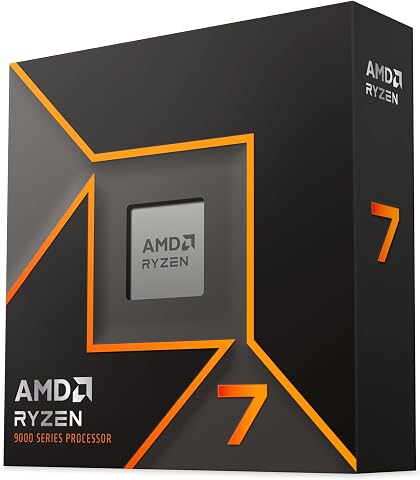 AMD Ryzen 7 9700X 8-Core, 16-Thread Unlocked Desktop ProcessorView on Amazon →
 - 6
 AMD Ryzen 9 7900X 12-Core, 24-Thread Unlocked Desktop ProcessorView on Amazon →
 - 7
 AMD Ryzen 7 5700X 8-Core, 16-Thread Unlocked Desktop ProcessorView on Amazon →
 - 8
 AMD Ryzen 5 9600X 6-Core, 12-Thread Unlocked Desktop ProcessorView on Amazon →
 - 9
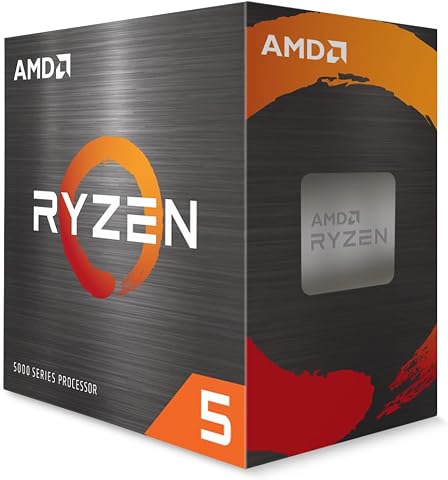 AMD Ryzen 5 5600 6-Core, 12-Thread Unlocked Desktop Processor with Wraith Ste…View on Amazon →
 - 10AMD Ryzen 5 5500 6-Core, 12-Thread Desktop Processor with Wraith Stealth CoolerView on Amazon →
Choosing a CPU Around Your Workload
The comparison highlights a common PC-building tradeoff: money spent on processor cores or specialized gaming performance is money unavailable for other parts of the system. For a gaming build, a buyer may prefer a processor suited to games and use the remaining budget on a stronger graphics card or additional memory. For rendering, encoding, compiling or running several demanding applications, a higher-core processor may be more appropriate if the software makes use of those cores.
The guide’s mention of AI in its framing should not be read as a tested verdict on AI performance. It supplies no information about particular AI applications, throughput, accelerator support or measured results. Readers choosing a CPU for AI work need task-specific evidence and should consider whether their software relies on the processor, a graphics card or other hardware.
Platform choice affects the total cost and later upgrade options. An AM4 processor may be a practical upgrade for someone with a compatible existing system, while a new platform can require a different motherboard and memory. Compatibility and cooling costs can change the value of a processor beyond its advertised specifications.
The Platforms Behind These Picks
The processors in the guide span different generations and motherboard platforms. Its newer Ryzen recommendations use AM5, while the Ryzen 5 5600, Ryzen 5 5500 and Ryzen 7 5800X3D are AM4 options. These sockets are not interchangeable, and compatibility also depends on the motherboard and, in some cases, firmware support.
The guide says cooler inclusion differs across the list: it identifies the Wraith Stealth as bundled with the Ryzen 5 5600 and 5500, but does not claim that every processor includes a cooler. A separate cooling solution may add cost and must fit the case and build. The source describes its selection method as weighing intended workload, platform generation, core and thread counts, and cooling needs, but gives no test protocol or benchmark data.
“The Ryzen 7 9800X3D is the gaming-first pick in this group.”
— ThorstenMeyerAI.com buyer’s guide
Benchmarks and AI Use Remain Unspecified
The source does not identify a publication date, prices, benchmark results or specific test systems, so readers cannot use it to compare measured performance or current value across all 10 chips. Its rankings are presented as buyer guidance, not as results from disclosed testing. It also does not name AI software or report how the processors perform on AI tasks, leaving AI suitability unverified.
Motherboard compatibility, cooler contents and system requirements can depend on the exact product and board. The guide advises checking manufacturer support information, but does not list every supported motherboard, firmware version or cooling configuration. No information is provided about price changes or product availability.
Verify Parts Before Building
Before buying, builders should match the processor to their most demanding regular applications, then check the motherboard manufacturer’s compatibility list and the exact cooler included in the package. They should also price the full system—including motherboard, memory and cooling—rather than comparing CPU prices alone. Buyers focused on AI should seek benchmarks for their intended software and hardware setup; this guide does not provide those results.
Key Questions
Which processor does the guide recommend for gaming?
It names the AMD Ryzen 7 9800X3D as its gaming-first pick. The source provides no benchmark figures, so that recommendation should be understood as the guide’s assessment rather than a quantified result.
Which options are presented for heavier multi-threaded work?
The guide points to the Ryzen 9 7900X and Intel Core Ultra 9 285K, noting that higher core counts matter most when the software can use them.
Does the comparison show which CPU is best for AI?
No. Although the topic includes AI, the source supplies no AI workload tests or measurements. Buyers need results for the specific AI software and system they plan to use.
What is the platform difference between AM4 and AM5?
They are different AMD motherboard platforms and are not interchangeable. An AM4 processor may suit a compatible existing system, while a move to AM5 can require a new motherboard and memory; check the board maker’s supported-processor list.
Do the listed processors include a cooler?
The guide says the Ryzen 5 5600 and Ryzen 5 5500 include Wraith Stealth coolers. It does not establish that every processor in the comparison includes one, so check the exact package before purchase.
Source: ThorstenMeyerAI.com
Fall Picks
fall essentials
As an affiliate, we earn on qualifying purchases.